We support YOLOv12 object detection inferencing via our Serverless Cloud API. YOLOv12 is supported in five sizes (n, s, m, l, x) for the object detection task.
For self-hosted deployment, see Roboflow Inference.
YOLOv12 input size is set when you train your model on Roboflow (typical values: 640x640 or 1280x1280).
YOLOv12 API
Get your API Key
Create a Roboflow account, find your key on the Roboflow API settings page and make it available to your shell:
export ROBOFLOW_API_KEY="your-key-here"Install the dependencies
Install the Inference SDK and supervision for decoding and visualizing predictions:
pip install -U inference-sdk supervisionRun the model
This example runs a public YOLOv12 model trained on a screws dataset (screw, flat-washer, hex-nut). Swap in your own {workspace}/{model-slug} to run your trained weights (see Versions, Trainings, and Models).
import os
import cv2
import supervision as sv
from inference_sdk import InferenceHTTPClient

image = sv.load_image_from_url("https://media.roboflow.com/docs/bolts.jpg")

client = InferenceHTTPClient(
    api_url="https://serverless.roboflow.com",
    api_key=os.environ["ROBOFLOW_API_KEY"],
)
result = client.infer(image, model_id="erik-pe6au/bolts-uzqzc-4-yolo12s-t1")

detections = sv.Detections.from_inference(result)

annotated = sv.BoxAnnotator().annotate(image.copy(), detections)

cv2.imwrite("annotated.png", annotated)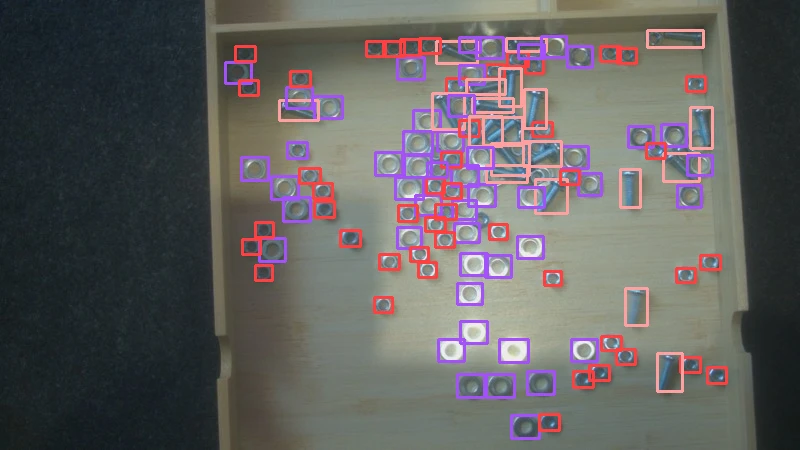
Set api_url to match your deployment target:
https://serverless.roboflow.comfor the Serverless Cloud API.http://localhost:9001for a local Inference server.- Your Dedicated Deployment URL for a private endpoint.