Depth Anything V2 is a monocular depth estimation model. It returns a normalized depth map (values between 0 and 1) for any input image.
Depth Anything V2 is not available on the Serverless Cloud API. Run it on a Dedicated Deployment or self-hosted Inference.
Depth Anything V2 API
Get your API Key
Create a Roboflow account, find your key on the Roboflow API settings page and make it available to your shell:
export ROBOFLOW_API_KEY="your-key-here"Install the dependencies
Install the Inference SDK:
pip install -U inference-sdk opencv-python supervisionRun the model
Set api_url to your Dedicated Deployment URL or a local Inference server. The script colorizes the depth map and writes a side-by-side comparison with the input.
import os
import cv2
import numpy as np
import supervision as sv
from inference_sdk import InferenceHTTPClient

image = sv.load_image_from_url("https://media.roboflow.com/notebooks/examples/bicycle.png")
client = InferenceHTTPClient(
    api_url="https://your-deployment.roboflow.cloud",
    api_key=os.environ["ROBOFLOW_API_KEY"],
)
result = client.depth_estimation(image)

depth = np.array(result["normalized_depth"], dtype=np.float32)
depth = cv2.resize(depth, (image.shape[1], image.shape[0]))
depth_vis = (depth * 255).astype(np.uint8)
depth_color = cv2.applyColorMap(depth_vis, cv2.COLORMAP_INFERNO)

cv2.imwrite("depth_annotated.png", np.hstack([image, depth_color]))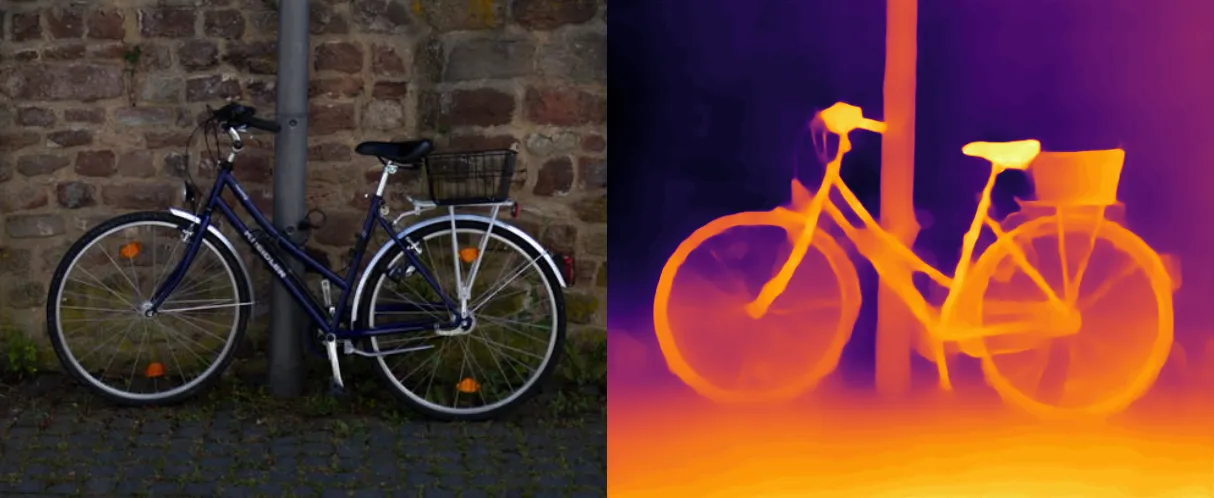
Depth Anything V2 inference speed
Latency measured with Roboflow Inference on 1x NVIDIA L4, batch size 1, mean after warmup.
| Model | Latency (ms) |
|---|---|
depth-anything-v2 | 40.1 |
Measured on the Small checkpoint.
Set api_url to match your deployment target:
http://localhost:9001for a local Inference server.- Your Dedicated Deployment URL for a private endpoint.
Depth Anything V2 available models
The depth estimation endpoint and the depth_estimation@v1 Workflow block serve two model families behind one ordinal-depth contract: an image-sized map normalized per image, where 1.0 is nearest and 0.0 is farthest.
- Depth Anything (relative depth):
depth-anything-v2/small,depth-anything-v3/small,depth-anything-v3/base - YOLO26 depth (metric depth, normalized on this path, substantially faster):
yolo26n-depth-768,yolo26s-depth-768,yolo26m-depth-768,yolo26l-depth-768,yolo26x-depth-768
The shared output preserves shape, range, and near-to-far ordering across models, but intermediate values are not geometrically equivalent between model families. Values are ordinal proximity scores, not physical distances, and must not be compared numerically across different images or model families. For absolute metric depth in meters from the YOLO26 checkpoints, load them directly with inference_models.AutoModel.
Depth Anything V2 response formats
The /infer/depth-estimation endpoint serializes normalized_depth according to the request's depth_map_format field:
json(default): a nested list of floats between 0 and 1. Wire-compatible with older clients, but roughly 17 MB for a 1080x810 image.png16: a base64 16-bit grayscale PNG (quantization step 1/65535, typically more than 10x smaller and much faster to serve).png8: a base64 8-bit grayscale PNG (256 depth levels, roughly another order of magnitude smaller). Fine for visualization and thresholding, lossy for derivative-based geometric use.
The SDK's depth_estimation() method defaults to json, so existing integrations keep receiving the nested list. Pass depth_map_format="png16" (or "png8") to opt in to the compact payload: the SDK decodes it back into a numpy.ndarray (call .tolist() if you need JSON-serializable output).
The SDK's json default is deprecated. In one of the first Inference releases of 2027 the default switches to png16 in a breaking way, and normalized_depth will then be returned as a numpy.ndarray. The SDK emits an InferenceSDKDeprecationWarning when the json format is used. Opt in to png16 early, or pass depth_map_format="json" explicitly to keep the list format after the switch. Raw REST callers are unaffected: the server-side default stays json.
Run Depth Anything V2 with self-hosted Inference
You can also load the model directly with the inference package.
Install the package
pip install "inference[transformers]"Use inference-gpu[transformers] on a GPU machine.
Authenticate with Hugging Face
The weights are pulled from Hugging Face, so set a Hugging Face token:
export HUGGING_FACE_HUB_TOKEN=your_token_hereRun the model
from PIL import Image

from inference.models.depth_estimation.depthestimation import DepthEstimator

model = DepthEstimator()

image = Image.open("your_image.jpg")
results = model.predict(image)

depth_map = results[0]["normalized_depth"]
visualization = results[0]["image"]
normalized_depth holds the per-image depth map, and image holds a colorized visualization where lighter colors are nearer and darker colors are farther.
Execution modes in Workflows
When used in a Workflow, depth estimation runs in one of two modes:
- Local execution: the model runs on your Inference server (GPU recommended).
- Remote execution: the model is invoked over HTTP on a remote Inference server through the
depth_estimation()client method.