Cosmos 3 Edge is NVIDIA's vision-language "world model." It is tuned for physical scene understanding: reasoning about spatial relationships between objects, checking scenes against safety conditions, and predicting what is likely to happen next. It accepts an image and a text prompt and returns a text response, with an optional system prompt to steer its behavior. We support Cosmos 3 Edge through our Serverless Cloud API, Dedicated Deployments, and self-hosted Inference.
Self-hosted Cosmos 3 Edge requires a CUDA-capable GPU. It cannot run on CPU. Run it on the Serverless Cloud API, a Dedicated Deployment with a GPU, or a GPU-backed self-hosted Inference server.
Cosmos 3 Edge API
Get your API Key
Create a Roboflow account, find your key on the Roboflow API settings page and make it available to your shell:
export ROBOFLOW_API_KEY="your-key-here"Install the dependencies
Install the Inference SDK:
pip install inference-sdkRun the model
The sample asks the nvidia/cosmos-3-edge model a physical-reasoning question about an image and prints the response.
import os
import cv2
from inference_sdk import InferenceHTTPClient

image = cv2.imread("my-image.jpg")
client = InferenceHTTPClient(
    api_url="https://serverless.roboflow.com",
    api_key=os.environ["ROBOFLOW_API_KEY"],
)
result = client.infer_lmm(
    image,
    model_id="nvidia/cosmos-3-edge",
    prompt="What is likely going to happen next in this scene?",
    max_new_tokens=128,
)
print(result["response"])
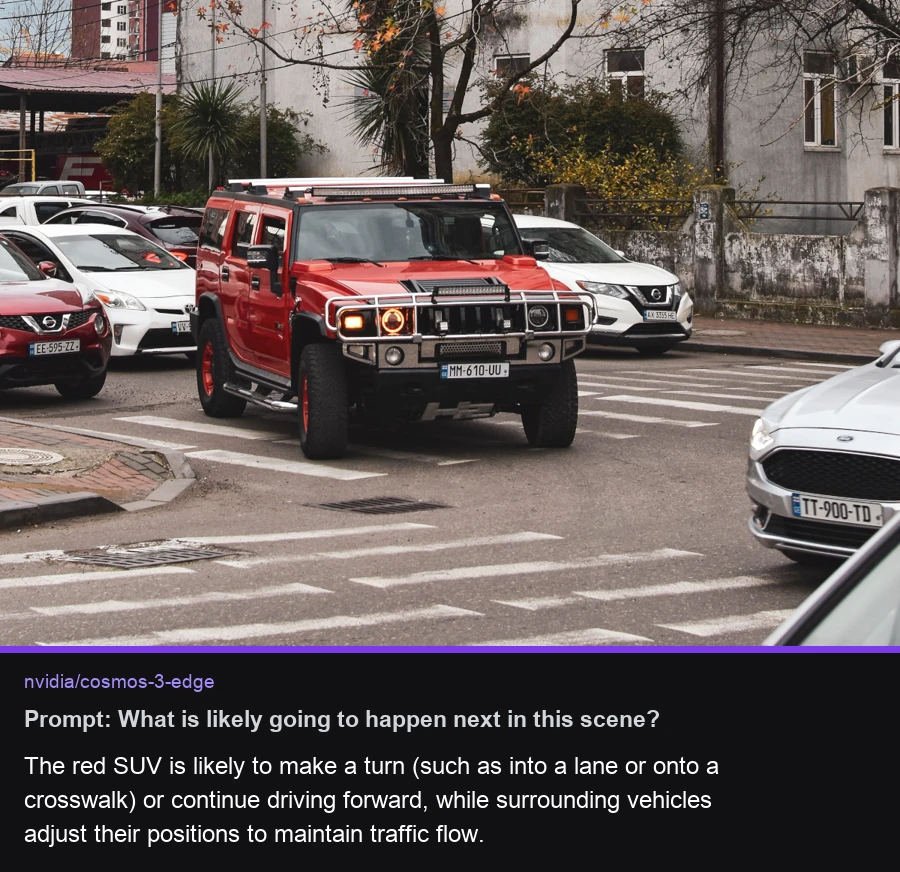
The code above prints the model response to the terminal. Here is the result on the sample image:
Use Cosmos 3 Edge in a Workflow
Cosmos 3 Edge is available in Workflows as the "Cosmos 3" block. The block takes an image and an optional text prompt (default "Describe what's in this image."), plus an optional system prompt, and outputs the model's text response. You can chain that output into downstream blocks for parsing, filtering, or notifications.
Set api_url to match your deployment target:
https://serverless.roboflow.comfor the Serverless Cloud API.http://localhost:9001for a local Inference server.- Your Dedicated Deployment URL for a private endpoint.
Run Cosmos 3 Edge with self-hosted Inference
Cosmos 3 Edge also runs on an Inference server you host yourself.
Self-hosted Cosmos 3 Edge requires a CUDA-capable GPU and the Cosmos build of the GPU Inference server Docker image (the -cosmos3 suffixed tags, ex: roboflow/roboflow-inference-server-gpu:1.3.9-cosmos3). The model depends on pre-release transformers builds that ship only inside those images. The standard latest image cannot run it, and installing the inference Python package with pip is not enough on its own.
Start a local server with the Cosmos image:
pip install inference-cli
inference server start --image roboflow/roboflow-inference-server-gpu:1.3.9-cosmos3  # serves http://localhost:9001
Then point the same SDK code at your server:
import os
from inference_sdk import InferenceHTTPClient

client = InferenceHTTPClient(
    api_url="http://127.0.0.1:9001",
    api_key=os.environ["ROBOFLOW_API_KEY"],
)

result = client.infer_lmm(
    inference_input="./my-image.jpg",
    model_id="nvidia/cosmos-3-edge",
    prompt="What is likely going to happen next in this scene?",
)
print(result["response"])
Run Cosmos 3 Edge with the Inference Python package
You can also run the model in-process with the Inference Python package, without an HTTP server. Because the Cosmos dependencies ship only in the -cosmos3 Docker image, run your script inside that image. Create app.py:
from inference import get_model

model = get_model("nvidia/cosmos-3-edge", api_key="YOUR_ROBOFLOW_API_KEY")

result = model.infer(
    "https://media.roboflow.com/dog.jpeg",
    prompt="What is likely going to happen next in this scene?",
)

print(result[0].response)
Then run it inside the Cosmos image:
docker run --rm --gpus all \
  -v $(pwd):/workspace -w /workspace \
  -v /tmp/model-cache:/tmp/model-cache -e MODEL_CACHE_DIR=/tmp/model-cache \
  --entrypoint python3 \
  roboflow/roboflow-inference-server-gpu:1.3.9-cosmos3 app.py
The /tmp/model-cache mount keeps the downloaded weights across runs. It is the same cache directory inference server start uses.