OWLv2 is Google's open-vocabulary object detector. You provide one or more example bounding boxes on a reference image, and OWLv2 detects similar objects in target images without any training.
OWLv2 is not available on the Serverless Cloud API. Run it on a Dedicated Deployment or self-hosted Inference.
OWLv2 API
Get your API Key
Create a Roboflow account, find your key on the Roboflow API settings page and make it available to your shell:
export ROBOFLOW_API_KEY="your-key-here"Install the dependencies
These packages call the API and draw its results:
pip install -U requests supervision opencv-pythonRun the model
The sample below uses a single example box on the input image as the prompt and detects matching objects in the same image. In practice you typically pass a separate reference image. Set URL to your Dedicated Deployment URL or a local Inference server.
import base64
import os
import cv2
import numpy as np
import requests
import supervision as sv

URL = "https://your-deployment.roboflow.cloud"
image = sv.load_image_from_url("https://media.roboflow.com/notebooks/examples/dog.jpeg")
_, buffer = cv2.imencode(".jpg", image)
image_base64 = base64.b64encode(buffer).decode("utf-8")

response = requests.post(
    f"{URL}/owlv2/infer",
    json={
        "api_key": os.environ["ROBOFLOW_API_KEY"],
        "image": {"type": "base64", "value": image_base64},
        "training_data": [{
            "image": {"type": "base64", "value": image_base64},
            "boxes": [{"x": 360, "y": 800, "w": 500, "h": 500, "cls": "dog"}],
        }],
        "confidence": 0.99,
    },
)
preds = response.json()["predictions"]

xyxys = [
    [p["x"] - p["width"] / 2, p["y"] - p["height"] / 2,
     p["x"] + p["width"] / 2, p["y"] + p["height"] / 2]
    for p in preds
]
detections = sv.Detections(
    xyxy=np.array(xyxys, dtype=float),
    class_id=np.array([p.get("class_id", 0) for p in preds]),
    confidence=np.array([p["confidence"] for p in preds], dtype=float),
    data={"class_name": np.array([p["class"] for p in preds])},
)
labels = [f"{p['class']} {p['confidence']:.2f}" for p in preds]
annotated = sv.BoxAnnotator().annotate(image.copy(), detections)
annotated = sv.LabelAnnotator().annotate(annotated, detections, labels=labels)
cv2.imwrite("dog_annotated.png", annotated)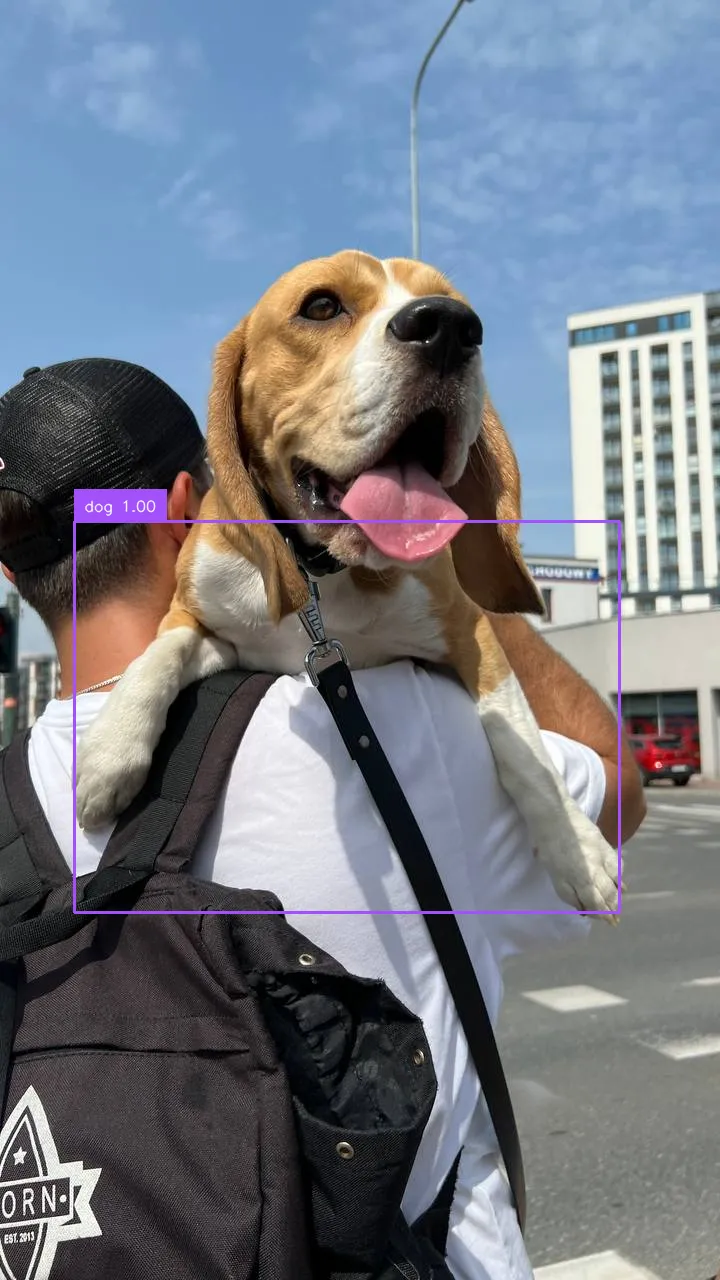
OWLv2 inference speed
Latency measured with Roboflow Inference on 1x NVIDIA L4, batch size 1, mean after warmup.
| Model | Latency (ms) |
|---|---|
owlv2 | 541.2 |
Measured on the owlv2-large-patch14-ensemble checkpoint with two text prompts.
Set URL to match your deployment target:
http://localhost:9001for a local Inference server.- Your Dedicated Deployment URL for a private endpoint.
OWLv2 confidences are typically very high (above 0.99). Tune the confidence parameter accordingly.
Run OWLv2 with self-hosted Inference
OWLv2 can be loaded directly with the inference package. The implementation in Inference detects objects from visual examples: you box one or more example objects, and the model finds similar ones.
Install the package
pip install "inference[transformers]"Use inference-gpu[transformers] on a GPU machine.
Run the model
import base64
import io

from PIL import Image

from inference.core.entities.requests.owlv2 import OWLv2InferenceRequest
from inference.models.owlv2.owlv2 import OWLv2

image = {"type": "url", "value": "https://media.roboflow.com/inference/seawithdock.jpeg"}

request = OWLv2InferenceRequest(
    image=image,
    training_data=[
        {
            "image": image,
            "boxes": [{"x": 223, "y": 306, "w": 40, "h": 226, "cls": "post"}],
        }
    ],
    visualize_predictions=True,
    confidence=0.9999,
)

response = OWLv2().infer_from_request(request)

visualization = Image.open(io.BytesIO(response.visualization))
visualization.save("owlv2_visualization.jpg")
Replace training_data with the example objects you want to match, and the image URL with your own input. The annotated result is written to owlv2_visualization.jpg.