We support Microsoft's Florence 2, a multimodal vision-language model, via our Serverless Cloud API. Florence 2 supports captioning, object detection, segmentation, and OCR through task prompts (such as <CAPTION>, <OD>, <OCR>, <REFERRING_EXPRESSION_SEGMENTATION>).
Florence 2 pretrained aliases
Use the alias as the model_id in your request and the runtime resolves it to the corresponding pretrained weights.
| Alias |
|---|
florence-2-base |
florence-2-large |
Florence 2 accuracy
Headline zero-shot metrics from the official model cards (base, large):
| Benchmark | florence-2-base | florence-2-large |
|---|---|---|
| COCO Caption (CIDEr) | 133.0 | 135.6 |
| COCO detection (mAP) | 34.7 | 37.5 |
| RefCOCO (accuracy) | 53.9 | 56.3 |
Florence 2 inference speed
Latency measured with Roboflow Inference on 1x NVIDIA L4, batch size 1, generating exactly 128 tokens with greedy decoding from the <CAPTION> prompt. Latency scales with output length, so use tokens/sec to estimate other lengths.
| Alias | Latency, 128 tokens (ms) | Tokens/sec |
|---|---|---|
florence-2-base | 652 | 198 |
florence-2-large | 1120 | 115 |
Florence 2 API
Florence 2 runs through the shared /infer/lmm endpoint. Call it through the HTTP endpoint directly with curl, or with the inference-sdk wrapper.
Get your API Key
Create a Roboflow account, find your key on the Roboflow API settings page and make it available to your shell:
export ROBOFLOW_API_KEY="your-key-here"Run the model
Call the /infer/lmm endpoint with a task prompt using curl:
curl --location 'https://serverless.roboflow.com/infer/lmm' \
  --header 'Content-Type: application/json' \
  --data '{
    "api_key": "'"$ROBOFLOW_API_KEY"'",
    "image": {"type": "url", "value": "https://media.roboflow.com/quickstart/dog.jpeg"},
    "model_id": "florence-2-base",
    "prompt": "<CAPTION>"
}'Get your API Key
Create a Roboflow account, find your key on the Roboflow API settings page and make it available to your shell:
export ROBOFLOW_API_KEY="your-key-here"Install the dependencies
This package calls the model:
pip install -U inference-sdk supervisionRun the model
Call the LMM inference endpoint with a task prompt:
import os
import supervision as sv
from inference_sdk import InferenceHTTPClient

image = sv.load_image_from_url("https://media.roboflow.com/quickstart/dog.jpeg")

client = InferenceHTTPClient(
    api_url="https://serverless.roboflow.com",
    api_key=os.environ["ROBOFLOW_API_KEY"],
)

result = client.infer_lmm(
    inference_input=image,
    model_id="florence-2-base",
    prompt="<CAPTION>",
)

print(result["response"])  # {'<CAPTION>': 'A man carrying a dog on his back.'}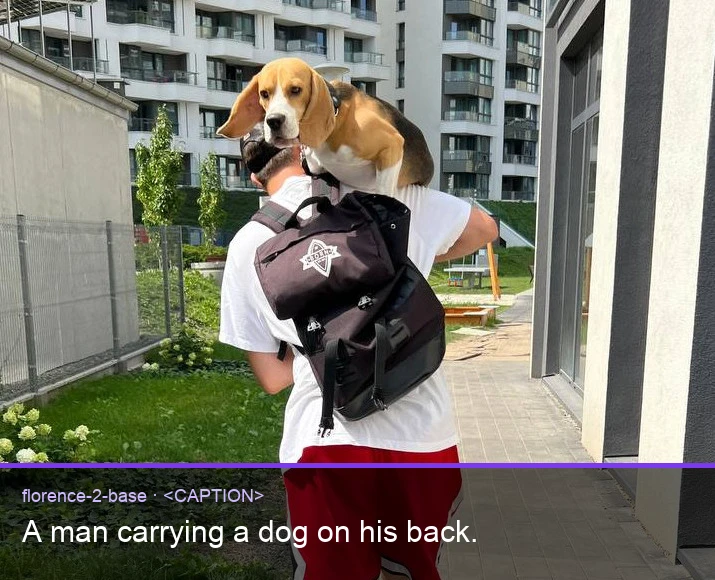
Set api_url to match your deployment target:
https://serverless.roboflow.comfor the Serverless Cloud API.http://localhost:9001for a local Inference server.- Your Dedicated Deployment URL for a private endpoint.
Swap <CAPTION> for any supported task prompt (for example <DETAILED_CAPTION>, <OD>, <OCR>, <OPEN_VOCABULARY_DETECTION>, <REFERRING_EXPRESSION_SEGMENTATION>) to switch between captioning, detection, OCR, and segmentation tasks.
For self-hosted deployment and the full list of task prompts, see the Inference documentation.
Florence 2 task prompts
Florence 2 switches task by prompt token. Pass one of the following as prompt:
| Task | Prompt |
|---|---|
| Object detection | <OD> |
| Dense region captioning | <DENSE_REGION_CAPTION> |
| Image captioning | <CAPTION>, <DETAILED_CAPTION>, <MORE_DETAILED_CAPTION> |
| Region proposal | <REGION_PROPOSAL> |
| Phrase grounding | <CAPTION_TO_PHRASE_GROUNDING> |
| Referring expression segmentation | <REFERRING_EXPRESSION_SEGMENTATION> |
| Region to segmentation | <REGION_TO_SEGMENTATION> |
| Open vocabulary detection | <OPEN_VOCABULARY_DETECTION> |
| Region to description | <REGION_TO_DESCRIPTION> |
| OCR | <OCR> |
| OCR with region | <OCR_WITH_REGION> |
Run Florence 2 with self-hosted Inference
Florence 2 can also be loaded directly with the inference package.
Install the package
pip install "inference[transformers]"Use inference-gpu[transformers] on a GPU machine.
Run the model
from inference import get_model

model = get_model("florence-2-base", api_key="YOUR_API_KEY")

result = model.infer(
    "https://media.roboflow.com/inference/seawithdock.jpeg",
    prompt="<CAPTION>",
)

print(result[0].response)
Swap <CAPTION> for any task prompt from the table above.
Execution modes in Workflows
When used in a Workflow, Florence 2 runs in one of two modes:
- Local execution: the model runs on your Inference server (GPU recommended).
- Remote execution: the model is invoked over HTTP on a remote Inference server.